Quote, progress, invoice, hand over
From the first line of the contract to the final balance of the site.
Discover
Construction pack
& progress statements
Follow the progress of your projects or sites
Invoice your progress statements
Enter the percentage of progress item by item. Invoice with a proportional recovery of the down payment, present progress statements with the contract amount, the cumulative progress and the share already invoiced
The acceptance report and the meeting record, shared with the project owner, complete the Construction pack.
Invoice progress as it is announced at the site meeting
Without the Construction pack
Progress is entered as a deliverable quantity: someone reopens the contract, converts each percentage into a quantity, item by item, then retypes the whole into a spreadsheet to keep an overview.
The down payment is deducted in one go: the native wizard offers a checkbox, so the adjustment waits for the end of the site and is negotiated in front of the client.
The statement number, the contract amount, the cumulative progress and the share already invoiced are scattered across several documents. The client receives an invoice that says nothing about the state of the site.
Meeting decisions stay in a PDF minute, with no owner, no deadline and no reminder.
With the Construction pack
Progress entry as a percentage is enabled product by product or by quotation template, and is done directly on the order.
You choose the share of the down payment recovered on each statement: the whole, a percentage you set, or the remainder still to be settled. The adjustment is spread over the statements.
The statement comes out numbered, with the contract amount, the cumulative progress and the "already invoiced" column. It is understood on reading.
Decisions and actions are dated, assigned, including to an architect or an inspection body without an Odoo account, automatically chased as soon as they are late, and viewable by the project owner from their portal, where they can add their own.
Win back the invoicing week, keep the client's trust

Issue a statement that reads on its own
Number, contract amount, progress and share already invoiced appear on the document itself. The client understands on reading, and the site manager spends the day on site.

Recover the down payment as you go
The Construction pack lets you decide the fraction of the down payment recovered on each statement, posted to the down payment account of the category concerned, VAT rate by VAT rate.

Write a single acceptance report
The report takes up the project title and the site address, states the statutory guarantees of articles 1792 of the French Civil Code, and contains the reservations and the conditions for lifting them.
Enter a percentage, forget the conversion into quantities
On a contract in progress, each line carries the percentage completed: the very figure the site manager announces at the site meeting. They enter it as is, and the remainder to invoice follows immediately.
Entry as a percentage: can be enabled per product and per quotation template.
Work packages remain sections: the contract reads as it was negotiated, with its subtotals.
The remainder to invoice is calculated by itself.
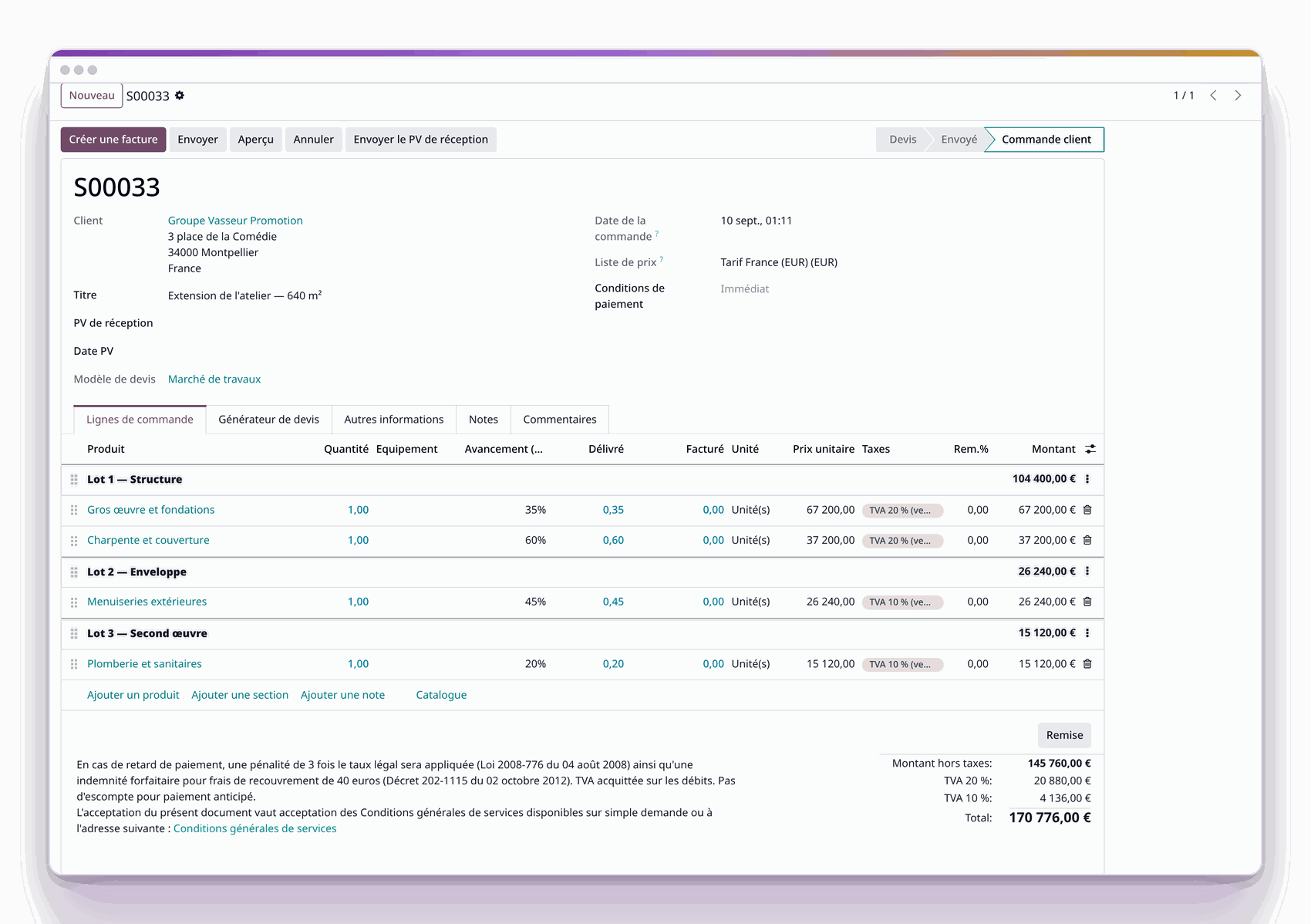
Contract in progress: 35%, 60%, 45% and 20% depending on the item, split into three work packages.
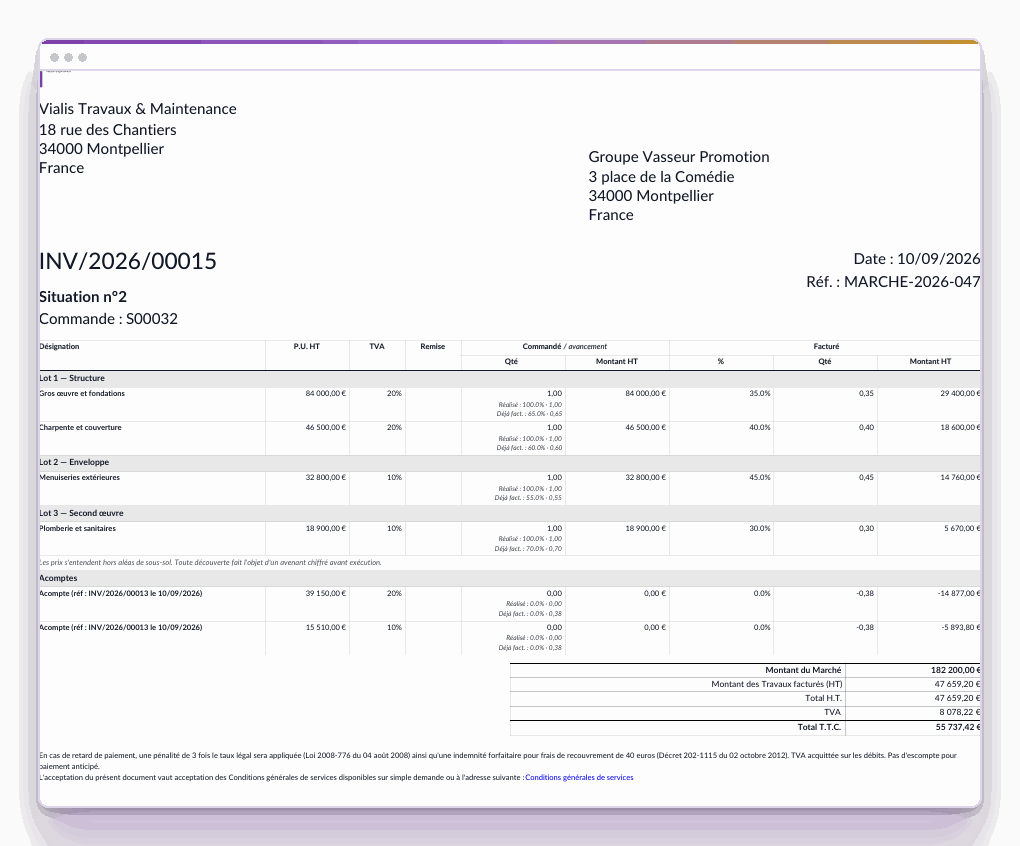
Statement no. 2: contract amount €182,200, two VAT rates, two down payments recovered.

Send a statement that is understood on its own
The document carries its statement number, the contract amount, the progress of each item and the share already invoiced. On the demonstration site, statement no. 2 shows a €182,200 contract, two VAT rates and two down payments recovered.
Statement number and contract amount carried by the invoice itself.
The project title follows the contract through to the last statement.
The down payments recovered appear in plain sight, line by line.
Subtotals per work package are printed.

Recover the down payment in the fraction you decide
A 30% down payment is recovered in fractions: a percentage on each statement, then the remainder on the last one.
Three recovery modes: the whole, a percentage, or the remainder still to be settled.
Down payment account per product category: the entry moves one account per rate.
The down payment stays separate from the statements in the numbering.
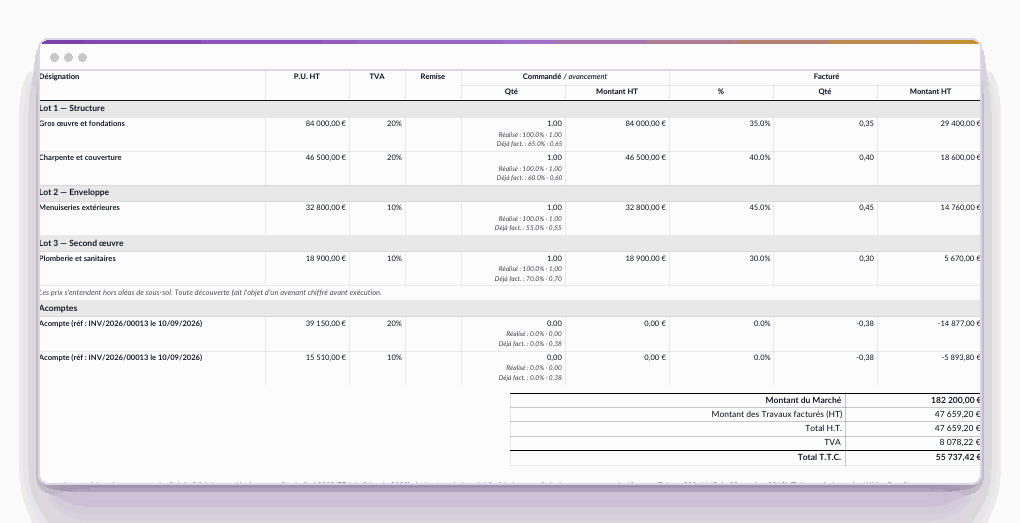
Two down payments recovered at 38% each on the same statement, one at 20%, the other at 10% VAT.
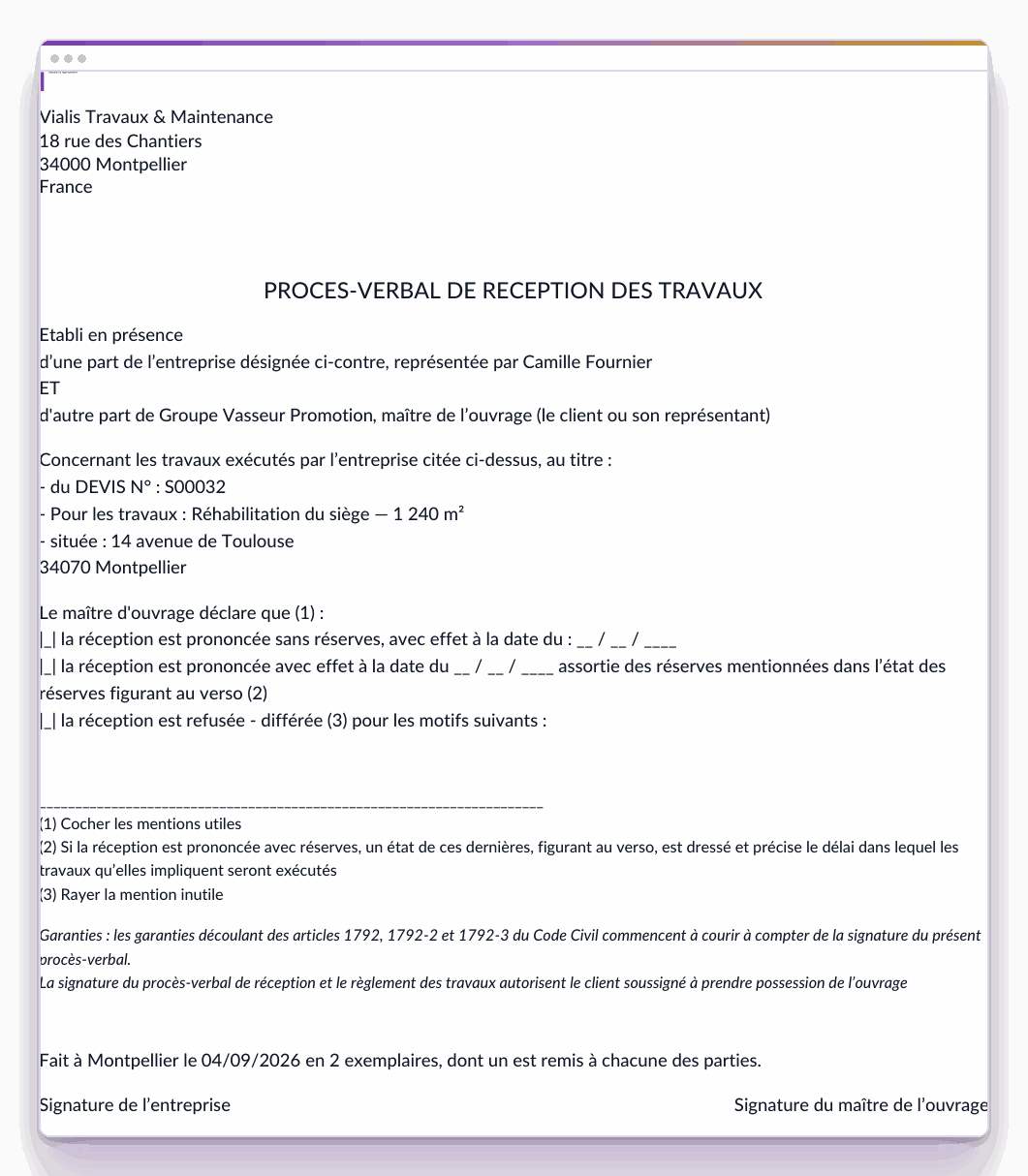
Acceptance report, with the site address and the project title.

Pronounce acceptance, reservations included
At the completion of the site, the document takes up the project title, the site address and the company's representative. The three outcomes appear on it, acceptance without reservations, with reservations or refused, and the record of lifting of reservations follows on the back.
Acceptance status and date carried by the order, hence viewable from the list.
The guarantees of articles 1792 of the French Civil Code are stated on it.

Keep the trace of decisions, let the pack chase the delays
Each site meeting produces a record: information, decisions and actions, each with its owner, its deadline and its status.
Automatic reminder of delays: the action that passes its deadline is notified.
Owner outside Odoo: the architect, the inspection body or the project owner can carry an action.
Priority and origin on each line, to find which meeting it comes from.
An action can become a project task.
Attachments (drawings, photographs, reports) are attached to the line concerned.
The record prints as is to be circulated to the participants.
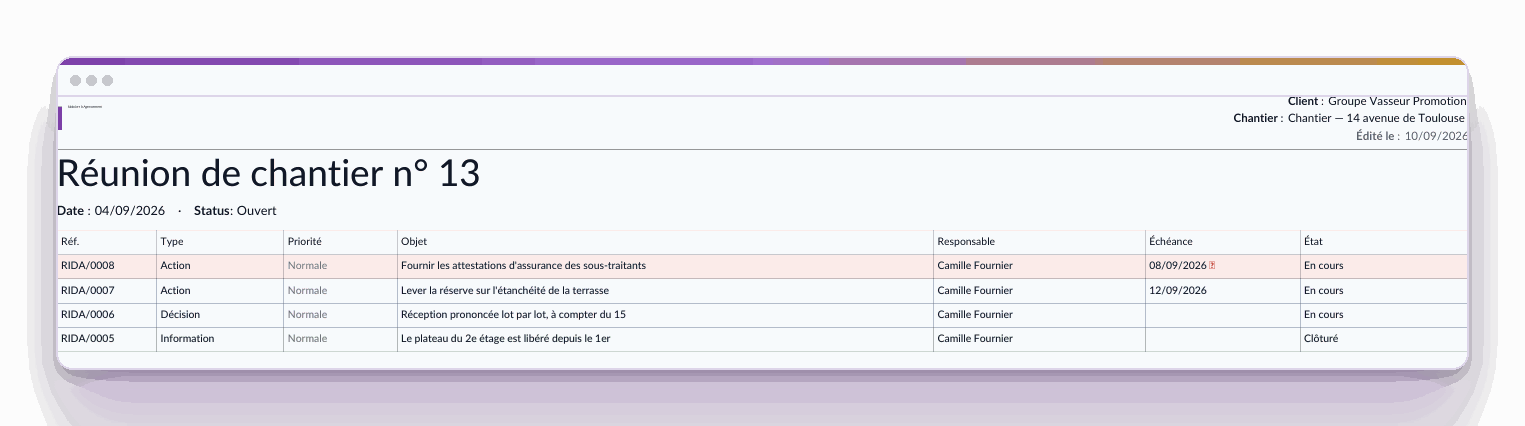
Meeting record: four typed lines, one late action flagged.
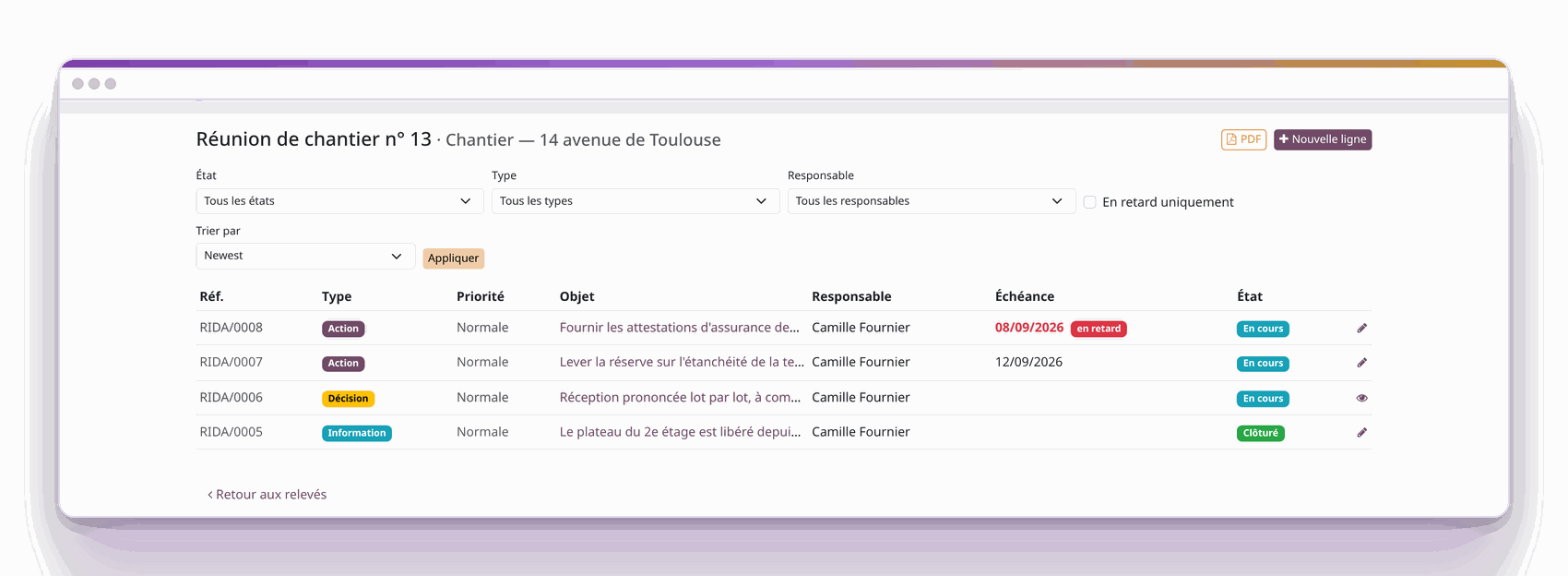
The customer portal: filters by status, by type and by owner.

Let the project owner contribute from their portal
The project owner opens the record, filters what concerns them, adds a line and attaches a document, from their customer portal, and without an additional Odoo licence.
Record counters: information, decisions, open actions and delays, at the top of the page.
Delays are flagged.
The record downloads as a PDF from the same page, in the exact state the filtering has just left it.
The exclusive features of the Construction pack

Follow a long contract, invoice it work package by work package
A structural work contract is negotiated by work package and invoiced by statement for months. The negotiated breakdown survives through to the last invoice.
Work packages as sections: the contract keeps its structure, with its subtotal per work package.
The initial down payment is recovered at the pace of progress.
Acceptance is pronounced work package by work package if the site requires it.

Carry two VAT rates on the same site
Renovation at 10%, new work at 20%: the same contract carries both, and the down payment is split by rate.
One down payment account per category, hence one account per rate.
The down payment entry moves them separately.

Trace the priced contingencies along the way
A discovery in the basement changes the contract. What was agreed, and on what date, remains readable six months later, in front of the client as in front of the expert.
The contract notes carry the execution reservations.
Dated and assigned decision: the record says who decided, when, and on what.
The client validates from their portal, which leaves an enforceable trace.
A late action comes up by itself.
Before managing your first contract
No. Each item progresses at its own pace, and the statement invoices the share completed since the previous one.
Yes, and that is the pack's main contribution. You choose on each statement: the whole, a percentage, or the remainder still to be recovered.
The down payment is split by rate, and each share is posted to the down payment account of the product category concerned.
No. They open their customer portal, consult the meeting record, add a line and attach a document. They see what concerns them.
Yes. The owner of a line can be a contact rather than a user: the architect, the inspection body or the project owner carry their actions like yours.
It carries an owner, a deadline and a status. As soon as it passes its date, it is flagged and chased, and it can become a project task.
With a 30 day trial on an instance set up in a few minutes. For the layout of your quotations and invoices, the Documents pack can be added.