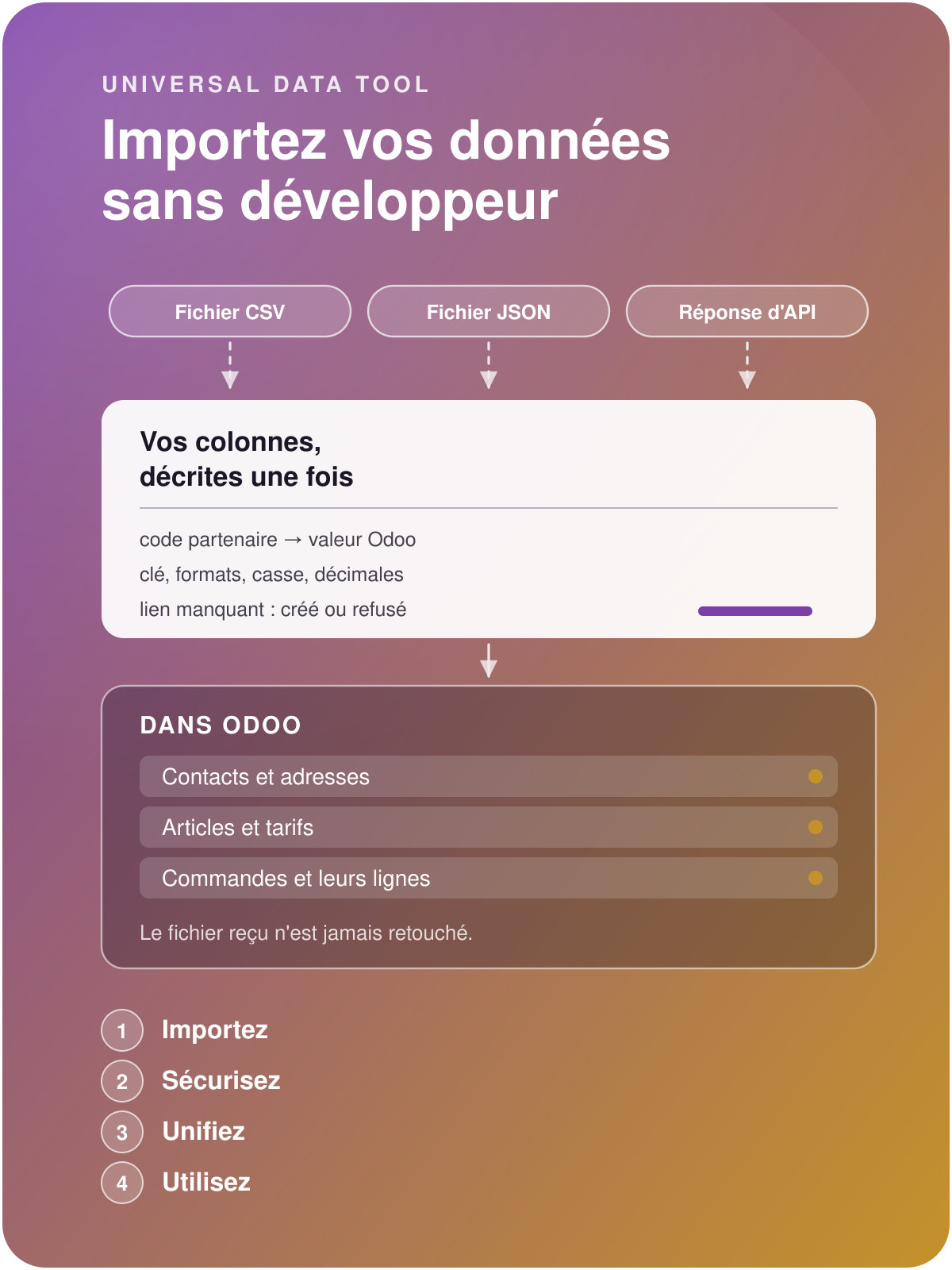

Universal Data Tool
Import your data
without development
Map your historical data, import in create or update mode, handle errors individually and re-run imports, fill in missing columns, handle header + lines imports, and much more, without reworking the original source.
Migrate your history quickly and safely
Without Universal Data Tool
The file is reworked before every import: reformatting dates, correcting decimals, filling in missing columns, removing duplicates, removing rows already imported...
You use Odoo's native import tool, which is insufficient, inefficient for large volumes, and imports nothing at the first error.
The data is not qualified against your business requirements but against Odoo's native constraints, which are often insufficient.
If a developer makes the fundamental mistake of importing directly into the SQL database, data integrity is compromised.
With Universal Data Tool
You configure each import once and can run it as many times, on as many files, as you want.
Error handling is done row by row, not file by file: the import moves on, and you always know what remains to be redone.
You define the enrichment rules for missing data durably, without touching the original files.
You divide the cost of your data migration by five on average, and your data is qualified.
Start the data migration from the very beginning of the project
Enrich it as the project progresses

Move forward, preserve your history
New software transforms the way you organise your work. The quality of the migrated data secures your business and makes it easier for your teams to adapt.

Govern your data
Take advantage of the Odoo roll-out to seize the opportunity of setting up data governance (uniqueness, security, access) for data that is part of your capital.

Start your business flows
At each import iteration, review the errors and clean them at the source: start your Odoo in the best conditions, with sound, ready-to-use data.

Define each source, local or remote
Are the source files regularly updated on a remote server? Universal Data Tool reads them, processes them and files them. The import runs as background tasks to smooth the load and free the users, who review the errors as they go.
Three formats: Excel, CSV, JSON.
Any class of Odoo object can be imported: system, settings, master data, transactions.
Your flat files become structured objects in Odoo, headers and lines rebuilt.
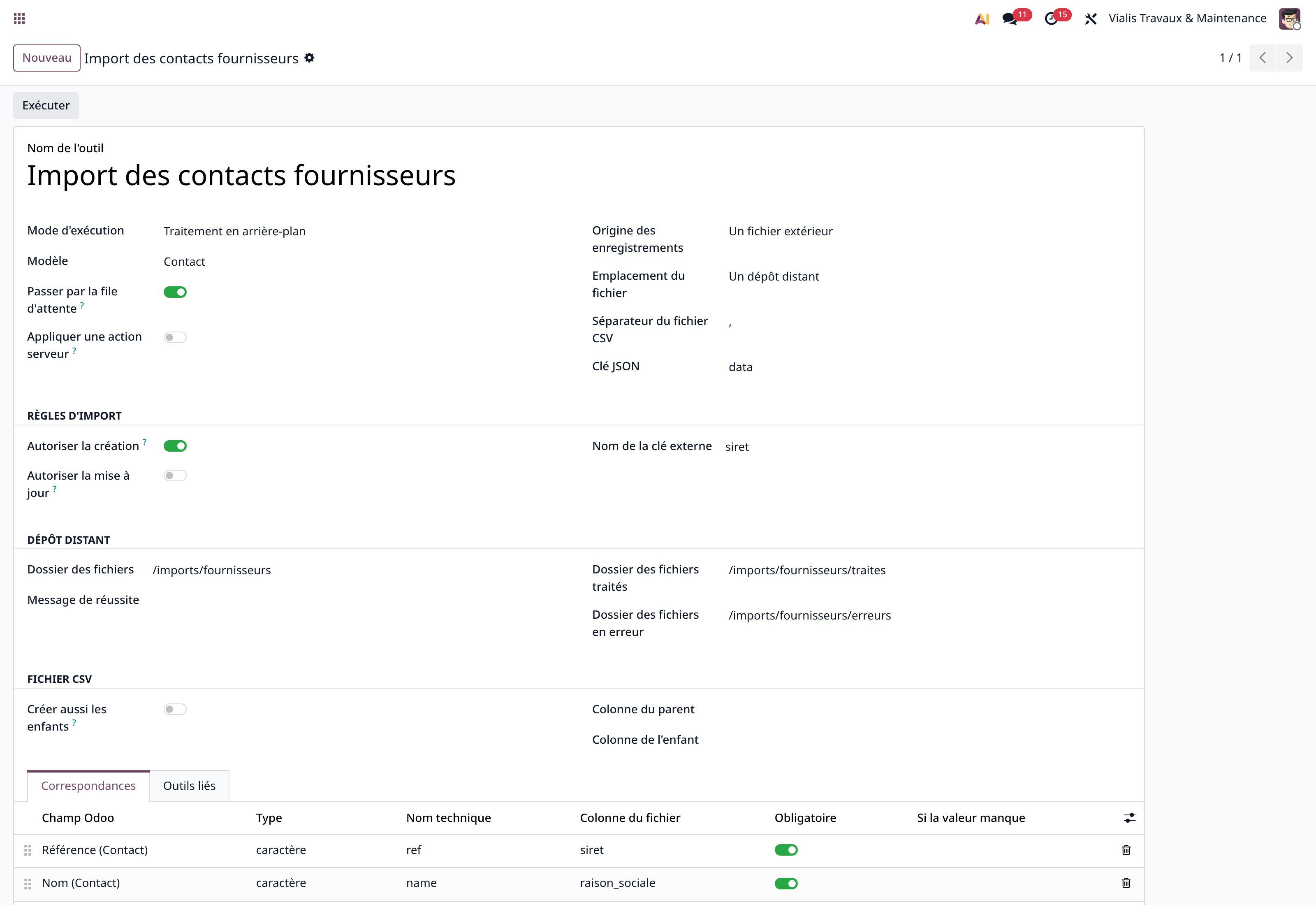
Example of a supplier contacts import
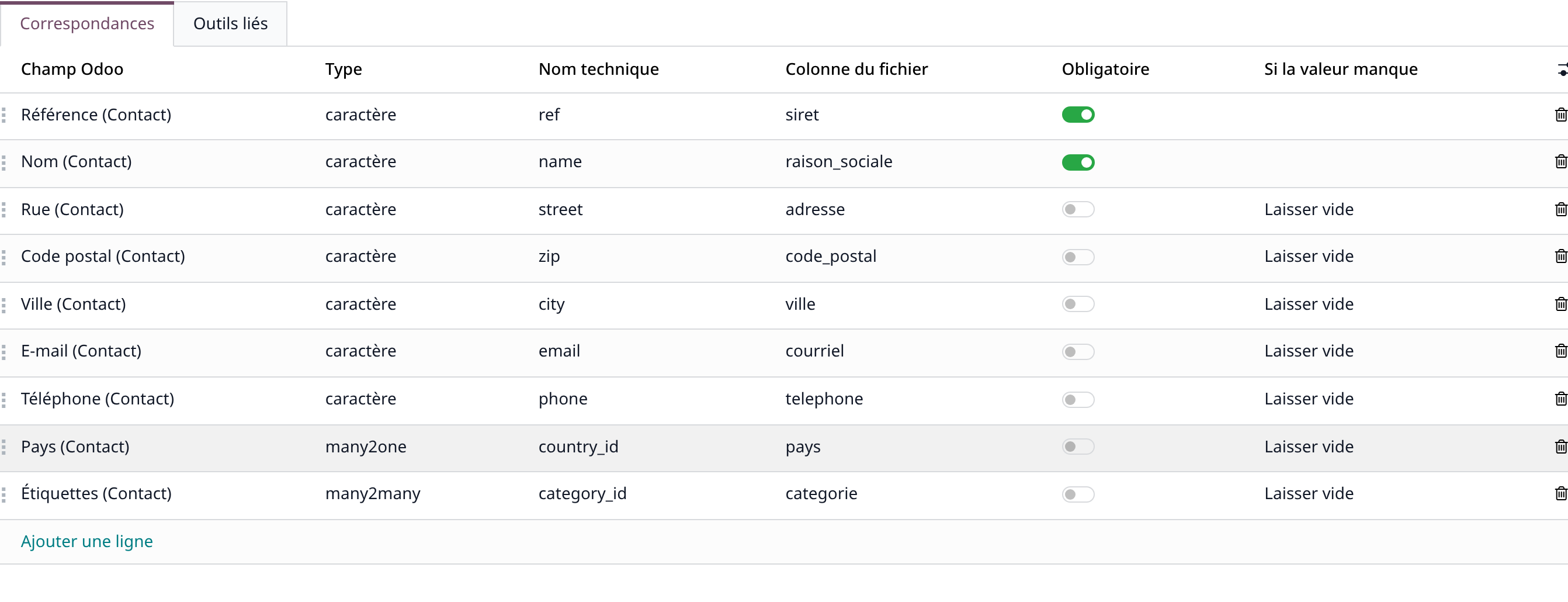
Nine mappings: type, source column, and the rule when the value is missing.

Describe each column once, leave the file untouched
Type, source column, rule when the value is missing: each mapping is declared on the column, once and for all. The file received is never touched, and a missing linked record can be created on the way.
Nine mappings describe the import in the screenshot, including the rule applied when the value is missing.
The import order stops being a constraint: the missing linked record is created on the fly if you decide so.

Translate the source codes into Odoo's values
The source writes "A", "B", "C"; Odoo expects its labels. You declare the conversion on the column, and the case is normalised on the way: company number in upper case, e-mail in lower case.
As many mappings as the column requires.
Your data arrives qualified and enriched, ready for use.
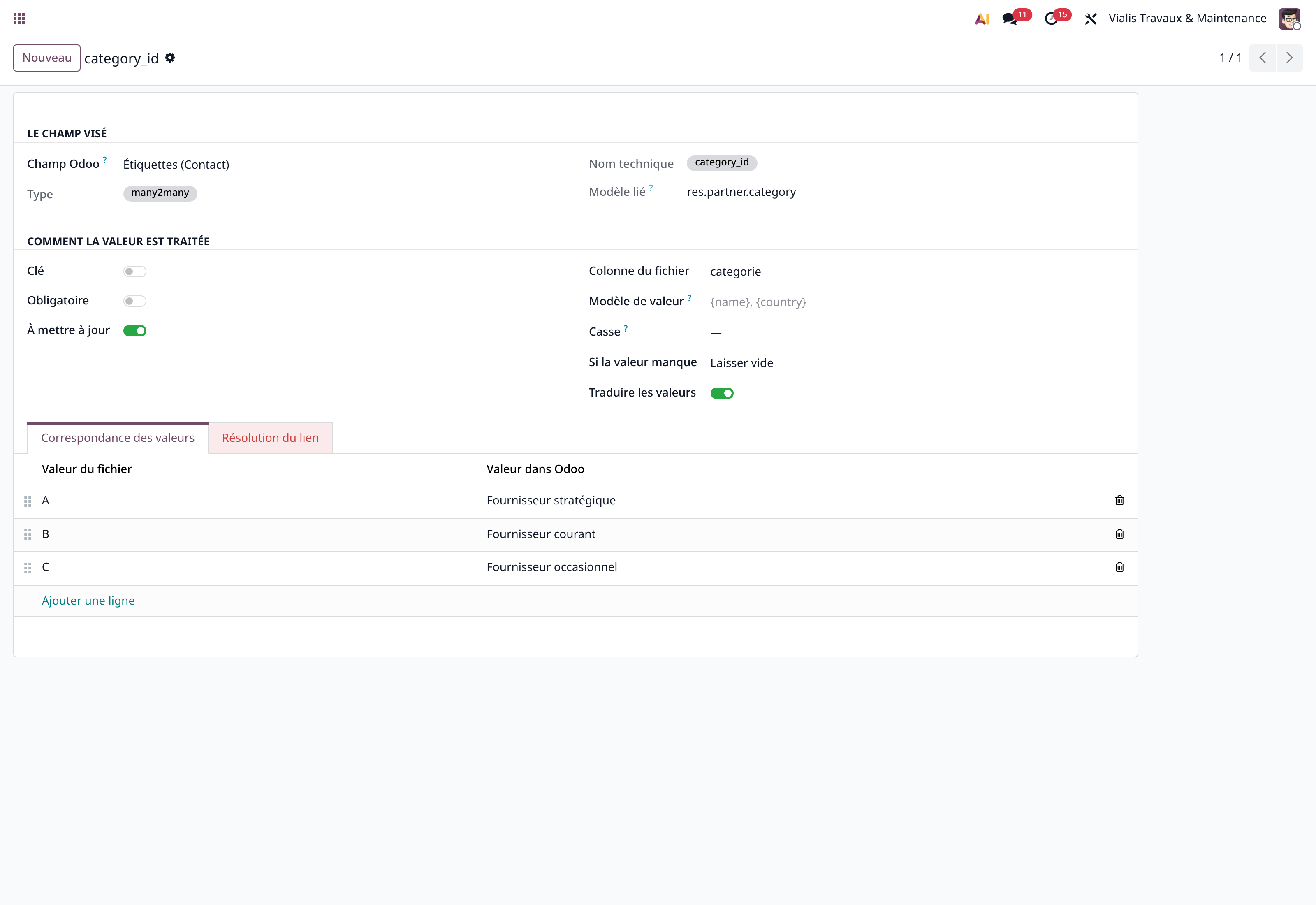
A "category" column translated into labels, on a contacts import
The innovative, exclusive features

Import without a developer, describe your columns once
The source file is processed as is by Universal Data Tool, which converts it, enriches it and imports it.
Value mapping: the file's codes become Odoo's values.
Case normalisation: upper case, lower case, on the fly.
Date and decimal formats: declared once on the column.
Multiplier: cents become euros, grams become kilos.
Default value: when the column is absent from the file received.
Excel, CSV or JSON, for your files dropped by hand or picked up from a repository.
Images and attachments: a column carries the file itself or its address.

Secure what an import is allowed to do
What you forbid matters as much as what you allow: data governance starts with the migration.
Right to create, right to update: both are decided separately for each record, and column by column for updates.
Mandatory column: if it is missing, only the record concerned is rejected, the rest of the file is imported.
Rules when an optional value is missing: leave empty, take a default, fill in from a parent, or reject the row.
Processed and error folders: you always know what remains to be redone.

Re-run the import with the same configuration
The next file updates, corrects or enriches the previous one: the key finds what is already imported.
Queue: a large batch is processed as background tasks to smooth the server load and free the users, errors are visible in real time.
Server action after import: apply a post-import processing automatically, handy for removing manual actions.
In the other direction: the same mapping is used to produce a file or the content of a call to send.
Before launching your data migration
The column marked as key finds what exists: nothing is duplicated. What gets rewritten is decided field by field: a column not marked "to update" is only set at creation.
From experience, the cost of data migration, one-off or recurring, is divided by five on average. This cost is often underestimated before the project, then drifts with iterations and uncontrolled back-and-forth; the design of Universal Data Tool reduces that risk.
No, that is the whole point. Universal Data Tool reads the source directly, then enriches it and imports it according to the durable configuration.
You choose, column by column: leave empty, take a default value, read the value on another linked record, or reject the row. The linked record can also be created on the fly.
No, and that is a frequent confusion: Universal Data Tool maps a file or an API response. Universal Connector runs the call, and Universal API describes the service.
Proven, at customers in production: with hundreds of thousands of objects imported or exchanged between Odoo and external APIs.
Receive the checklist for a successful data migration
Five parts, thirty-three checks: scope and sources, keys and duplicates, rules when a value is missing, create and update rights, re-run and error tracking. Enter your e-mail, the document opens straight away.